
We all know the importance of breakglass accounts, to assist us in regaining access in the event of accidental lock-out, or in the case of a security incident. (Note that Microsoft recommends having more than one!). However, too often do we see that these accounts are not secured as well as they should be.
Top Tips:
Have two - Seriously.
Microsoft recommends two or more breakglass accounts. Why? So that the failure or compromise of one does not leave you locked out. You have a greater chance of recovering your tenancy.
Make the accounts cloud-only
Use the tenant's *.onmicrosoft.com domain rather than synchronising them from AD or relying on federation. Your recovery account should not depend on Entra Connect, AD FS, another IdP, or your on-premises infrastructure being operational.
Do not use PIM
It may sound counter-intuitive from a security perspective, but give the accounts permanent Global Administrator. The whole point is that these accounts still works if your normal privileged-access processes are unavailable.
Do not use them for routine administration
These accounts are the holy grail. The "oh shit" accounts. The "We really f*cked up" accounts. Using them should sound every alarm bell, and should require full documentation of when they were used, why they were used, how they were used, and by whom. Usage of these accounts should effectively be treated as a security incident.
Don't just alert on sign in
Ideally, any change to these accounts should trigger an alert. Password reset, authentication method registration/removal, role modification, group membership changes and account disablement are all interesting events. They should be alerted through the SIEM and the security team should treat these alerts as very high priority.
Store credentials and security keys separately
Microsoft specifically recommends secure, separate locations such as fireproof safes. Two FIDO2 keys stored in the same drawer beside the same laptop isn't really redundancy. However, whilst it is recommended to separate these keys, it is also prudent to ensure that they're accessible (and not on the other side of the world when they are needed the most!).
Consider: Can these keys be obtained and used within 15-30 minutes after the requirement is raised?
TEST the accounts. Please.
The last thing you want is for you to be in dire need of emergency access to the tenancy, and your breakglass accounts don't work because nobody tested them. Microsoft explicitly recommends quarterly validation. Test authentication and an administrative operation, confirm the monitoring alert fires, review CA exclusions, and then record the test.
This test should be fully documented, with screenshots, to prove continuous testing. It is advised also that each time you test you rotate who actions this, so that different individuals within the business know who to contact, when, and how.
Have a documented procedure
Define who can authorise use, who retrieves the credentials/key, what counts as an emergency, how activity is recorded and what happens afterwards.
Authentication
We are all aware that a breakglass account with a simple password is not secure. The password should be lengthy, complex and secure. Store this physically in a secure location - Storing this in a password vault is great until this goes down and you lose access.
Enablement does not mean enforcement...!
We should enable our account for FIDO2 passkeys where possible, however just enabling this does not necessarily mean that it is enforced. What we should do is enforce this with a Conditional Access policy to set an authentication strength:
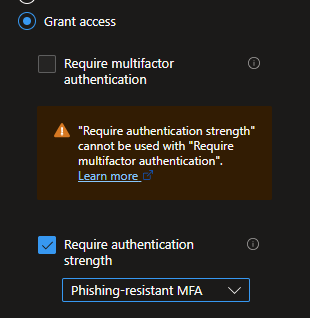
Tip: You can also use an authentication context, and secure protected actions with an authentication context to require re-authentication with a FIDO key for protected actions. There is a fantastic blog on this here: https://www.chanceofsecurity.com/post/mastering-microsoft-entra-authentication-contexts-part-1
Conditional Access
Location
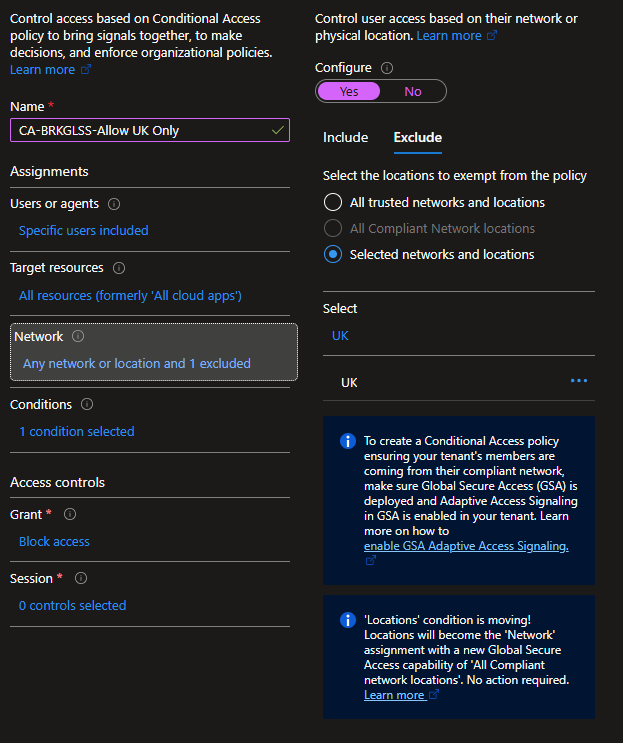
Whilst best practise is to exclude your breakglass from every Conditional Access policy, I would advise supplemental policies that only target your breakglass accounts. For example:
If you only have offices in the US, why would we allow our Breakglass account to log in from anywhere? Instead, we can leverage a Conditional Access policy to only allow login if the login originates from the US.
CA-BG-LOC-Allow US Only
I am aware that this can be spoofed, but we are reducing the attack surface against the account and preventing access from very obviously untrusted locations.
Example:
Require MFA
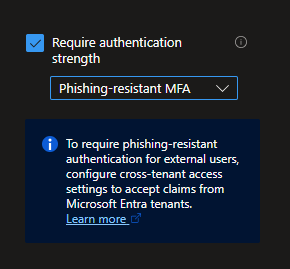
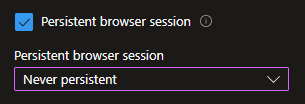
Your Breakglass account should absolutely be configured for MFA, however too often do people simply stop at "require MFA". Instead, set an authentication context (as above) and require a strong form of MFA. At the same time, we can configure the browser session to never persist.
Sentinel Alerting
We can leverage Microsoft Sentinel to alert on key events for a breakglass account. For example:
Breakglass account login
let BreakGlassAccounts = dynamic([
    "[email protected]",
    "[email protected]"
]);
SigninLogs
| where UserPrincipalName in~ (BreakGlassAccounts)
| order by TimeGenerated desc
Breakglass account password reset
let BreakGlassAccounts = dynamic([
    "[email protected]",
    "[email protected]"
]);
AuditLogs
| where Category == "UserManagement"
| where OperationName has_any (
    "password",
    "Password"
)
| where TargetUserPrincipalName in~ (BreakGlassAccounts)
| order by TimeGenerated desc
Breakglass account authentication method changed
let BreakGlassAccounts = dynamic([
    "[email protected]",
    "[email protected]"
]);
AuditLogs
| where LoggedByService =~ "Authentication Methods"
| where TargetUserPrincipalName in~ (BreakGlassAccounts)
Breakglass account role modification
let BreakGlassAccounts = dynamic([
    "[email protected]",
    "[email protected]"
]);
AuditLogs
| where Category =~ "RoleManagement"
| where OperationName has_any (
    "Add member to role",
    "Remove member from role",
    "Add eligible member to role",
    "Remove eligible member from role",
    "Add member to role completed",
    "Remove member from role completed"
)
| mv-expand TargetResource = TargetResources
| extend
    TargetUserPrincipalName = tostring(TargetResource.userPrincipalName)
| where TargetUserPrincipalName in~ (BreakGlassAccounts)
| order by TimeGenerated desc
Breakglass account group membership change
let BreakGlassAccounts = dynamic([
    "[email protected]",
    "[email protected]"
]);
AuditLogs
| where Category =~ "GroupManagement"
| where OperationName has_any (
    "member",
    "membership"
)
| mv-expand TargetResource = TargetResources
| extend
    TargetUserPrincipalName = tostring(TargetResource.userPrincipalName)
| where TargetUserPrincipalName in~ (BreakGlassAccounts)
| order by TimeGenerated desc
Breakglass account disabled
let BreakGlassAccounts = dynamic([
    "[email protected]",
    "[email protected]"
]);
AuditLogs
| where Category =~ "UserManagement"
| where OperationName =~ "Disable account"
| mv-expand TargetResource = TargetResources
| extend TargetUserPrincipalName = tostring(TargetResource.userPrincipalName)
| where TargetUserPrincipalName in~ (BreakGlassAccounts)
| order by TimeGenerated desc
Philip Marsh
Writing practical notes on Microsoft security, identity protection, detections, and building safer systems.
View all posts